
The tablet goes away. Within a minute, your child follows you into the kitchen: “There’s nothing to do.” You suggest drawing, a puzzle, or going outside. Every idea gets the same answer: “Boring.” If your child feels bored without a screen, another long activity list may not solve the immediate problem.
Start smaller. Acknowledge the feeling, check whether they need rest or connection, and offer two manageable choices. Help with the first step if needed. Keep the agreed screen boundary clear, while allowing some time when nothing exciting happens.
This guide is for parents of children roughly aged 5–12. The goal is a more workable transition into everyday play—not a home where children never complain or adults provide entertainment all afternoon.

Why a child feels bored without a screen
“I’m bored” can describe several different experiences. Your child may miss a favourite game, want company, feel tired, or have no idea how to begin an activity independently.
Ask one question: “Are you looking for something to do, someone to do it with, or a rest?” They may not know. Their answer is a clue, not a diagnosis.
The American Academy of Pediatrics recommends considering the child, content, calming strategies, what media displaces, and family communication through its 5 C’s media guidance. This encourages a broader view than counting minutes alone.
Avoid telling your child their brain is “broken by screens.” Feeling bored without a screen does not, by itself, establish addiction. Nor does it prove a need for a “dopamine detox.” Look at the pattern: when does it happen, what does the screen provide, and what makes the next activity hard to start?
What to say when your child is bored without a screen
Keep your response short enough to use when everyone is tired. Here is an illustrative conversation:
Child: “I’m bored. Can I have the tablet?”
Parent: “You wish you could keep playing. We’re finished with the tablet for now. Would you like help starting something, or a quiet break?”
Child: “Nothing else is fun.”
Parent: “You don’t have to feel excited yet. I can start a drawing with you, or you can sit near me while I finish here.”
You have acknowledged disappointment and offered support without promising to remove the feeling immediately. If your child rejects both options, pause instead of naming twenty more.
A calm boundary might be: “Those choices are here when you want them.” Stay available for genuine needs; boredom is not a reason to dismiss hunger, distress, or a request for connection.
Check the need before choosing screen-free activities
When a child is bored without a screen, the most useful activity depends on what is missing. Try this small decision table rather than a random list.

| What you notice | Possible need | A practical first step |
|---|---|---|
| They follow you and reject solitary toys | Company | Begin a two-person activity briefly |
| They slump, yawn, or become tearful | Rest, food, or less demand | Offer a familiar snack if hungry, or a quiet pause |
| They want to build but never get materials out | Help starting | Put out a few pieces together |
| They miss playing with online friends | Social contact | Plan an available offline social opportunity together |
| They ask when screens return repeatedly | Predictability | Refer to one clear, agreed plan |
These are possibilities, not explanations to impose. An online friendship can matter to your child. A solitary craft will not necessarily meet the same need.
Make the first step visible
“Go and play” leaves every decision to the child: where to go, what to find, and what to make. Try a more concrete invitation:
- “The paper is here. Shall we draw the first road together?”
- “Choose three blocks for the base. Then you decide what goes above them.”
- “Would you like to make a pretend menu while I prepare dinner?”
Offer enough help to get started, then step back when that suits your child. Support can be reduced gradually; it does not have to disappear on a fixed schedule.
Six screen-free activities with an easy starting point
Choose by interests and abilities. The ages below are rough guides, not milestones. Use suitable materials and supervision, and keep small parts away from children who mouth objects or younger siblings.
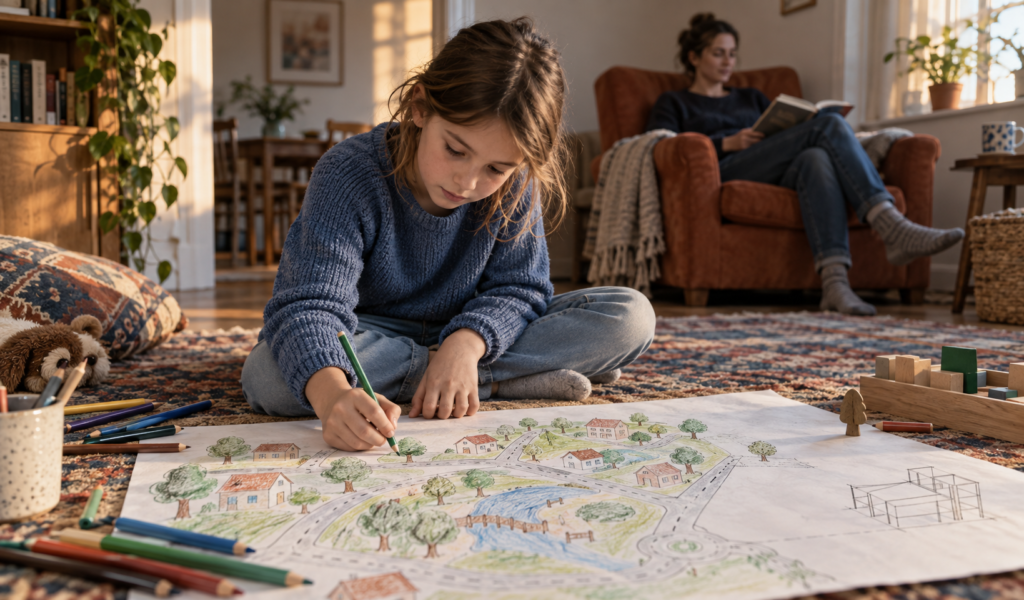
1. Draw a place from their favourite game
Starting range: ages 5–12. Materials: paper and crayons.
Invite your child to draw an imaginary town, animal home, or landscape inspired by what they enjoy. Begin with one road or room. Younger children can dictate ideas while you draw; older children can add their own rules or map key.
This uses an existing interest to open a creative activity. It does not require rejecting everything connected with gaming.
2. Open a pretend café nearby
Starting range: ages 5–8. Materials: paper and safe, unbreakable cups.
Ask for one pretend drink, then let your child invent the menu. Keep the setup on a low table away from hot food and cooking equipment. Drawing an order is optional; pointing or speaking works too.
This offers shared play when your child wants connection. If you are busy, explain what you can actually do: “I can place one order now.”
3. Build something that can stay unfinished
Starting range: ages 5–12. Materials: age-appropriate blocks.
Start a small bridge, animal shelter, or unusual building. Agree where it can remain until later so your child does not have to complete it in one sitting. Use large pieces and a reachable surface when needed.
For more challenge, ask your child to invent the brief. For less effort, simply place pieces side by side without a goal.
4. Make a tiny comic
Starting range: ages 7–12. Materials: paper and a pencil.
Fold a sheet into four sections. Draw a character wanting something, meeting a problem, trying an idea, and reaching an ending. Stick figures count. A younger child can tell the story while an adult draws; an older child might continue it tomorrow.
Leave spelling corrections for another time unless help is requested. This is leisure, not extra homework.
5. Go on a familiar noticing walk
Starting range: ages 5–12. Materials: none.
Take an accessible, supervised route and notice one thing that has changed: a flower, a shop display, or a cloud shape. No points or worksheet are needed.
Adapt to an indoor route or a view through a closed window if weather, mobility, or sensory needs make going out difficult. Choose movement your child finds comfortable.
6. Keep a small “next time” basket
Starting range: ages 5–12. Materials: two familiar activities.
Together, choose two things your child has actually enjoyed, such as drawing supplies and a suitable puzzle. Keep them accessible. When they finish playing, ask whether they want the same options next time.
This reduces setup decisions. It is not a shopping list or a requirement to rotate toys daily. Replace an option because it no longer works, not because it seems too ordinary.
For a wider choice, see our guide to activities beyond screens.
Plan the transition before screen time ends
The hardest moment to design a family rule is often the moment a child is upset. Discuss the endpoint earlier: the end of a selected episode, a saved game, or another clear stopping point within your family’s plan.
The AAP’s guidance on screen-time transitions recommends calm responses and predictable expectations. Adapt cues to your child rather than assuming the same timer works for everyone.
Try three practical changes:
- Show what happens next. “After this episode, we’ll have a snack, then you can choose your activity.”
- Avoid an accidental restart. Turn off autoplay and avoid starting something new just before the endpoint.
- Allow a landing period. Your child can put the device down and rest before beginning another task.
If a child is bored without a screen during that pause, the plan has not automatically failed. Do not turn every complaint into a negotiation about the next device session.
At the same time, screen boundaries should distinguish entertainment from communication aids, accessibility tools, homework, and other essential uses. A child who relies on a device to communicate needs continued access to that function.
When your child refuses every alternative
Check whether your proposed “fun” is really work. Extra worksheets, compulsory chores, or an adult-directed craft may not feel like a break.
You can leave a small space for boredom without withdrawing care. “You can rest, look around, or choose something later” gives permission for a slow start. Avoid promising that boredom always creates brilliant ideas.
The Canadian Paediatric Society’s guidance on digital media supports balanced routines, meaningful use, and adult modelling. In practice, choose an achievable family change rather than announcing a total reset you cannot maintain.
For example, protect one manageable period after school for food, conversation, or play. If you need your phone for work, explain that briefly and make your availability clear. Parents do not need to pretend devices have no useful role.
For a child who finds transitions, sensory demands, or starting tasks difficult, offer familiar options and visual cues if those help. Do not interpret needing more support as deliberate defiance. Our article on helping a child who gets frustrated easily offers related ways to respond.
Notice what changes over several days
Use a brief note rather than a scorecard:
| Notice | Example observation |
|---|---|
| When boredom appeared | Immediately after a game; before eating |
| What support you offered | Snack and help drawing one road |
| What happened next | Drew briefly, then chose to rest |
| What to change | Put paper out earlier; keep the same endpoint |
The example is invented. You are looking for useful patterns, not a deadline for independent play. Less conflict, clearer requests, or choosing an activity with some help can all be worthwhile changes.
If your child remains bored without a screen, ask whether the alternative meets the need you identified. More toys will not necessarily solve tiredness or loneliness.
Frequently asked questions
Is being bored without a screen a sign of addiction?
Not on its own. Look beyond the complaint to sleep, relationships, school, and the ability to enjoy daily life. Seek professional advice if media use is causing persistent difficulties or family distress.
Should I ban screens until my child learns to play?
A complaint about boredom does not by itself justify a blanket ban. Start with clear, age-appropriate expectations and realistic opportunities for other activities. Consider what the child uses the device for before changing access.
What if I cannot play with my child all afternoon?
Offer a small amount of help you can sustain. Set up an accessible activity nearby and explain when you can check in. Younger children and children with additional support needs may need more supervision or assistance; independent play is not the same as being left unsupervised.
When should I ask for more help?
Talk with a healthcare professional if loss of interest extends beyond the period after screens, or if you notice persistent low mood, sleep difficulties, isolation, or problems with daily functioning. Ask the teacher about patterns at school too. Do not assume every change is caused by devices.
Start with one calmer response today
The next time your child says they are bored without a screen, pause before suggesting more things. Ask what they need, offer two workable choices, and help with one first step. Keep the boundary predictable and leave room for a quiet start.
Tonight, choose those two options with your child—before tomorrow’s screen time begins.